University Science Presentation – Slides: A Practical Template for Academic and Research Presentations
Preparing a clear, professional slide deck for a scientific conference, research defense, or academic lecture often demands more than just good content. The visual structure, the readability of data, and the overall consistency of the deck can significantly influence how your audience receives your findings. University Science Presentation – Slides is a Google Slides template designed specifically for this context, offering a structured layout with scientific icons, infographics, and a clean academic aesthetic. It is worth discussing not because it promises to dazzle with flashy animations, but because it aims to solve a recurring problem: how to present complex information in a way that is both polished and effortless to edit.
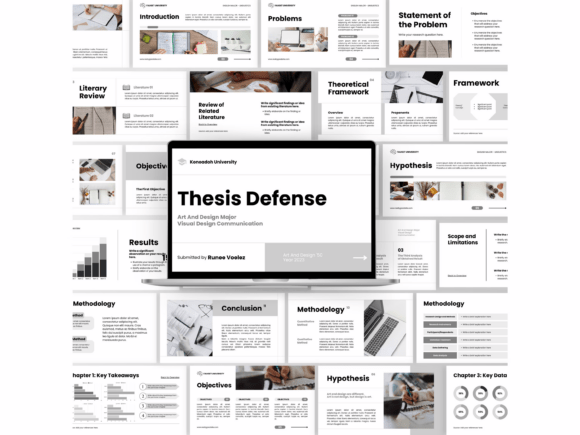
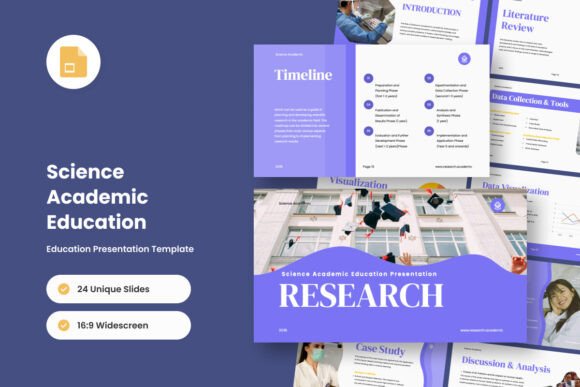
This template provides a complete set of slide designs built around a 16:9 widescreen ratio, which is now standard for most projectors and screens used in academic settings. All graphics within the file are resizable and fully editable, and the template relies on free web fonts that are both recommended and commonly available. The package includes PPTX and PDF formats, and it is compatible with Google Slides, making it accessible whether you work locally in PowerPoint or prefer a cloud-based workflow. The inclusion of picture placeholders—simple drag-and-drop zones—eliminates the tedious process of manually cropping and aligning images. Everything is built on master slides, so global changes to fonts, colors, or spacing can be applied in seconds rather than slide by slide.
What Makes This Template Distinct for Scientific Communication
The core strength of University Science Presentation – Slides lies in its visual vocabulary. Scientific presentations often require a balance between textual explanation and data visualization. This template provides pre-designed infographic elements, icon sets that are relevant to research contexts, and structured content blocks that naturally guide the eye from one piece of information to the next. Unlike generic presentation templates that prioritize aesthetics over clarity, this one appears to have been built with an understanding of how academic audiences consume information.
The slide designs are not merely decorative. They establish a consistent visual hierarchy, which is crucial when you are presenting methods, results, or theoretical frameworks. Each slide type—whether it is a title slide, a section divider, a data chart layout, or a conclusion summary—has a deliberate amount of whitespace. This prevents your slides from feeling cluttered, even when you need to include several bullet points or a complex diagram. The icons, while scientific in nature, are kept simple and monochromatic, so they support the content rather than compete with it.
One practical observation is that the template handles long-form text reasonably well. Many academic templates fail at this because they are designed around short marketing phrases. Here, the layouts account for the reality that a research slide often contains a full sentence or two of context, a figure caption, and a reference citation. The font sizing and spacing feel calibrated for readability at a distance, provided you do not overload any single slide with excessive text.
Usability and Editing Workflow in Real-World Use
When evaluating a template for real-world use, editing speed matters. Researchers and educators rarely have hours to spend on slide design. University Science Presentation – Slides reduces friction in several intentional ways.
First, the reliance on master slides means that adjusting the color palette to match your institution’s branding or a specific journal’s style is straightforward. You change the master, and every slide updates accordingly. Second, the picture placeholders are genuinely drag-and-drop. You do not need to resize or reposition images; the placeholder frame automatically masks your image to the correct aspect ratio. This might seem like a small detail, but it saves significant time when you have a dozen figures to insert.
Third, the free web fonts used in the template are well-chosen for screen readability. Fonts like Lato, Roboto, or Open Sans (depending on the version) render cleanly on both low- and high-resolution displays. They also maintain legibility when projected on a large screen. The PDF export option is useful for those who need to share a static version of the presentation for review or submission to conference organizers who request a preview.
A possible limitation worth noting is that the template is designed primarily for a clean, minimal aesthetic. If your presentation style relies heavily on bold color blocks, dramatic gradients, or animated transitions, this template may feel restrained. Its strength is consistency and clarity, not visual spectacle. Likewise, while the infographic elements are useful, they are not overly complex. If you need to create highly customized data visualizations far beyond bar charts, line graphs, or basic flow diagrams, you may still need to build those outside the template and import them.
Flexibility Across Disciplines and Presentation Types
Although the name suggests a science focus, the template is broad enough to serve multiple disciplines within the academic spectrum. Presenters in biology, chemistry, physics, engineering, public health, psychology, and even some social sciences will find the layouts suitable. The icons are generic enough—molecules, microscopes, graphs, people, gears—that they do not lock you into a narrow field.
Here are a few realistic scenarios where this template performs well:
- Conference presentations: The structured layouts help you stay within typical time limits by forcing concise content placement.
- Research proposal defenses: The section dividers and summary slides allow you to clearly separate background, methods, expected outcomes, and timeline.
- Journal club or lab meetings: The infographic slides are useful for breaking down a complex figure from a recent paper.
- Guest lectures or teaching: The consistent formatting helps students follow along without visual distraction.
- Poster presentations (adapted): While not designed for posters, the slide content can be exported and rearranged for a poster layout if needed.
The template also works well for collaborative projects. Because it is based on master slides and uses standard fonts, multiple co-authors can work on the same deck in Google Slides without formatting conflicts.
Quality, Consistency, and Long-Term Value
From a quality standpoint, the template shows attention to alignment, spacing, and proportion. The slide designs are not cutting-edge in the sense of trendy 2024 design fads, but that is a strength in this context. Academic audiences value predictability. When every slide in your deck follows the same grid and the same visual logic, your audience spends less cognitive effort parsing the layout and more effort absorbing your message.
The long-term value of a template like this depends on how frequently you present. For a researcher who gives three to four conference talks per year, the template will pay for itself in time saved within a single use. For an educator who delivers lectures weekly, it becomes a foundational asset that can be reused and adapted semester after semester.
One note on file format: the inclusion of both PPTX and PDF gives you flexibility. The PPTX file is fully editable in PowerPoint or Google Slides. The PDF is useful for quick distribution, printing, or submitting to conference committees that require a read-only version. Just be aware that the PDF does not preserve editability, as expected.
A limitation that some users may encounter is that the template does not include built-in animation presets or animated slide transitions. You can add your own in PowerPoint or Google Slides, but the template itself does not come with preconfigured motion effects. For many academic settings, this is actually preferable, since animations can distract or cause technical issues on older conference room computers.
Who Benefits Most from This Template
University Science Presentation – Slides is best suited for individuals who present research or educational content regularly and value efficiency over originality in visual design. The following groups will likely find it most useful:
- Graduate students preparing thesis defenses or conference presentations, especially those who are not confident in their design skills and want a reliable baseline.
- Postdoctoral researchers who need to produce polished decks quickly for multiple speaking engagements.
- Faculty members who lecture across multiple courses and want a consistent visual identity for all their materials.
- Lab managers who coordinate group presentations and need a unified template that multiple team members can use.
- Science communicators and bloggers who adapt presentation content for online articles or videos and need slides that look professional when screenshotted.
- Small business owners in technical or biotech fields who present to investors, partners, or clients and want a credible, no-nonsense aesthetic.
If, on the other hand, you are a designer or someone who enjoys building custom visuals from scratch, this template may feel too prescriptive. It is a tool for production speed, not for creative experimentation. Also, if your presentation needs to follow very specific institutional branding guidelines with custom colors, logos, and font restrictions, you may need to modify the master slides considerably, though that is still possible.
Practical Recommendations for Maximum Effectiveness
To get the most out of University Science Presentation – Slides, consider these practical tips:
- Start by customizing the master slide colors to match your institution or lab group. This takes five minutes and instantly makes the deck feel like your own.
- Use the infographic elements sparingly. One well-placed diagram or timeline per section is more effective than covering every slide with icons.
- Take advantage of the drag-and-drop placeholders for figures, but also crop or adjust your images before importing them. The placeholder maintains aspect ratio, but it cannot fix a poorly composed image.
- Export to PDF for review copies, but always keep the editable PPTX as your working master. You will inevitably need to make last-minute changes before a conference.
- Test your slides on an actual projector before the event. The template’s font sizes are generally good for projection, but room size and screen distance vary widely.
One more subtle point: because the template is designed with a clean academic look, it pairs well with speaker notes. When presenting, the slides serve as visual anchors while your spoken narrative provides the depth. This separation of roles—slides as structure, speaker as explanation—is exactly what effective scientific communication requires.
Final Assessment: Does It Fit Your Needs?
University Science Presentation – Slides fills a specific niche well. It is not a one-size-fits-all presentation solution, but for academic, scientific, and research-oriented communication, it addresses the core needs of clarity, speed, and consistency. The template’s reliance on master slides, free web fonts, and simple drag-and-drop placeholders means that even someone with minimal design experience can produce a professional-looking deck in under an hour.
The key trade-off is between customization freedom and production efficiency. If you need a presentation that looks credible without requiring you to build every element from scratch, this template is a strong choice. If you need complete creative control over every visual detail, you may find the template’s structure limiting. For most researchers, educators, and professionals who present scientific content regularly, the efficiency gain far outweighs the creative constraints.
Ultimately, the value of any presentation template is measured by how well it helps you communicate your ideas. In that regard, University Science Presentation – Slides succeeds by getting out of its own way. It provides a clean, readable, and professionally structured canvas that lets your research speak first and your design speak second.