Mastering Visual Storytelling with the Horizontal Timeline Premiere Pro Template
In today's fast-paced digital world, presenting information clearly and engagingly is more important than ever. Whether you're a content creator, a business professional, or a marketer, you've likely faced the challenge of explaining a sequence of events, milestones, or future plans in a way that captures attention and conveys meaning at a glance. This is where the Horizontal Timeline Premiere Pro template steps in, offering a powerful solution for turning linear data into a compelling visual narrative.
But what exactly is a horizontal timeline, and why is this specific template worth your time? Let's explore the concept from the ground up, examine its practical applications, and discover how it can transform your next project.
What Is a Horizontal Timeline?
At its core, a timeline is a visual representation of events arranged in chronological order. While traditional timelines often run vertically, a horizontal timeline presents milestones from left to right, mirroring the natural way we read in many cultures. This layout is intuitive, spacious, and ideal for showcasing a sequence of developments without overwhelming the viewer.
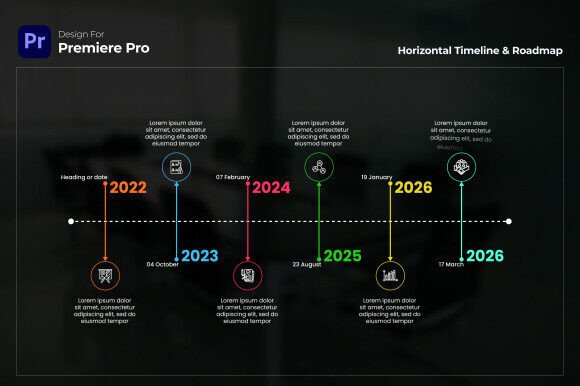
The Horizontal Timeline Premiere Pro template takes this concept and elevates it with clean, modern design elements. Each event or milestone is displayed with ample room for a title, a brief description, and a supporting icon. The result is a presentation that feels both professional and approachable, making complex information easy to digest.
Why Horizontal Matters
Choosing a horizontal orientation over a vertical one can significantly impact how your audience processes information. Horizontal layouts are particularly effective for:
- Narrative flow: They mimic the progression of time from left to right, reinforcing the concept of forward movement.
- Space utilization: They work well in widescreen formats like Full HD 1920×1080, allowing you to include more detail without clutter.
- Comparison and contrast: Viewers can easily compare milestones side by side, noticing patterns and gaps.
When you combine this orientation with the dynamic layout features of the Horizontal Timeline template, you get a tool that is as functional as it is visually appealing.
Why Use a Timeline Template in Premiere Pro?
Premiere Pro is already a powerhouse for video editing, but creating custom infographics from scratch can be time-consuming. Templates like the Horizontal Timeline bridge the gap between professional design and efficient workflow. Instead of spending hours aligning text boxes, sourcing icons, and matching colors, you can focus on content and storytelling.
This template is fully customizable, meaning you retain complete creative control while benefiting from a pre-built structure. Whether you're a beginner or an experienced editor, the user-friendly design ensures a smooth experience. No plugins are required, and it is compatible with Premiere Pro CC 2023 and above, making it accessible for most modern setups.
Key Benefits at a Glance
- Time-saving: Cut your design process significantly and produce high-quality infographics faster.
- Professional typography: A free font link is provided, so your text looks sharp and polished without additional cost.
- Engaging visuals: Each milestone includes customizable icons and colors, allowing you to match your brand or theme.
- Dynamic layout: Events are arranged in a clean vertical format within the horizontal structure, perfect for linear storytelling.
Deep Dive: Features That Make a Difference
Let's take a closer look at what the Horizontal Timeline Premiere Pro template offers and how each feature contributes to a better presentation.
Dynamic Layout for Linear Presentations
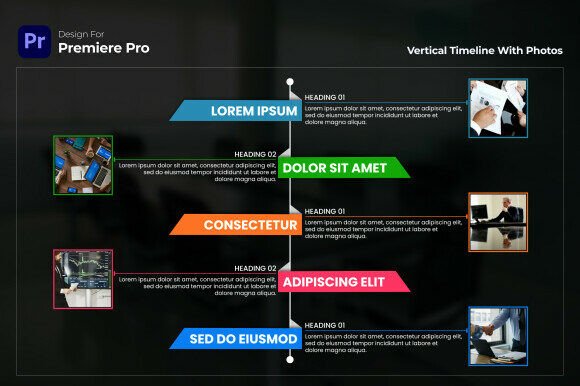
The template's layout is designed with storytelling in mind. Each event is displayed in a clean, vertical card format that sits along the horizontal axis. This hybrid approach gives you the best of both worlds: the forward momentum of a horizontal timeline and the readability of vertical text blocks. It's ideal for presentations that need to guide the viewer step by step, such as progress reports, company histories, or future roadmaps.
Customizable Icons and Engaging Colors
Icons are powerful communication tools. They can convey an idea in a split second, reducing the need for lengthy text. This template allows you to assign a unique icon to each milestone, making it easy to differentiate between events. Combined with the ability to adjust colors, you can create a lively, dynamic presentation that aligns with your brand identity or the mood of your project.
For example, a brand performance tracking timeline might use green for growth milestones, yellow for cautionary points, and red for challenges. This visual coding helps your audience understand the narrative without reading every word.
User-Friendly for All Skill Levels
One of the standout qualities of this template is its accessibility. Whether you're opening Premiere Pro for the first time or you're a seasoned editor, the template is easy to navigate. The layers and structure are clearly organized, and the customization options are straightforward. This reduces the learning curve and allows you to produce professional results almost immediately.
Free Font Resources for Sharp Typography
Typography can make or break a design. Poor font choices can make even the best content look amateurish. The inclusion of a free font link ensures that your text is not only readable but also visually appealing. You don't need to purchase expensive fonts or spend time searching for alternatives; everything you need is provided.
Practical Applications: Where This Template Shines
The Horizontal Timeline Premiere Pro template is versatile enough to be used across various industries and contexts. Here are some of the most common and impactful use cases:
Progress Reports and Roadmaps
If you need to communicate where a project has been, where it is now, and where it's going, a horizontal timeline is an excellent choice. You can highlight key milestones, deadlines, and achievements in a way that stakeholders can quickly grasp. This is especially useful for content strategy reviews or business presentations where clarity and impact are paramount.
Company History and Milestone Storytelling
Every company has a story. Whether you're celebrating an anniversary, launching a new brand, or onboarding new employees, a timeline can bring your history to life. Showcase founding dates, major product launches, expansion events, and awards in a format that is both informative and inspiring. The clean modern design of this template ensures that your company's narrative is presented with the professionalism it deserves.
Event or Milestone Timelines
From product launches to conference agendas, event planners can use this template to outline key moments. Attendees can see at a glance when sessions start, when networking breaks occur, and when major announcements are scheduled. The icon support adds an extra layer of clarity, making it easy to identify different types of activities.
Brand Performance Tracking
Marketing teams can track brand performance over time by mapping out campaign launches, social media milestones, revenue targets, and market expansions. The ability to customize colors and icons means you can create a visual language specific to your brand's journey. This makes internal reporting more engaging and easier to act upon.
Content Strategy Reviews
Content strategies evolve, and documenting that evolution helps teams understand what worked and what didn't. Use the timeline to map out content pillar launches, audience growth milestones, platform changes, and seasonal campaigns. This historical perspective can inform future strategies and improve decision-making.
Common Misunderstandings About Timeline Templates
Some users hesitate to use templates because they worry the end result will look generic or inflexible. However, the Horizontal Timeline Premiere Pro template is built for customization. You are not locked into a rigid format; rather, you are given a solid foundation that you can adapt to your specific needs.
Another misconception is that timeline templates are only for large corporations or professional designers. In reality, anyone with a story to tell can benefit. Small businesses, educators, nonprofit organizations, and even individuals creating personal projects can use this tool to communicate more effectively.
Technical Details and Compatibility
Before diving in, it's helpful to know what you're working with. The template is:
- Compatible with: Premiere Pro CC 2023 and above
- Plugins required: None
- Customization: Fully customizable, including text, colors, icons, and layout
- Resolution: Full HD 1920×1080, ensuring crisp output for both digital and broadcast use
These specifications mean you can integrate the template into your existing workflow without worrying about additional software or compatibility issues. It works out of the box and scales well for various delivery formats.
How to Get the Most Out of the Template
To truly leverage the power of the Horizontal Timeline Premiere Pro template, consider the following tips:
- Plan your content first: Outline your milestones, descriptions, and icon choices before opening the template. This saves time and ensures your story is coherent.
- Use color consistently: Assign meaning to colors and stick with it throughout your timeline. This creates a visual rhythm that viewers will intuitively follow.
- Keep descriptions concise: The template is designed for clarity. Use short, impactful text that complements the visual elements rather than competing with them.
- Experiment with icons: Icons are not just decoration; they are visual cues that enhance understanding. Choose icons that are universally recognizable or specific to your context.
Conclusion: Elevate Your Next Project with a Horizontal Timeline
In a world where attention spans are short and information is abundant, the way you present data matters. The Horizontal Timeline Premiere Pro template offers a practical, elegant solution for showcasing milestones, events, and plans. Its dynamic layout, user-friendly design, and customization options make it an invaluable tool for anyone who needs to tell a story over time.
Whether you're preparing a business presentation, documenting company history, or planning a content strategy, this template helps you communicate with clarity and impact. By combining the natural flow of a horizontal layout with the professional polish of a well-designed template, you can turn your timeline into a visual experience that your audience will remember.
Ready to bring your timeline to life? Explore the Horizontal Timeline Premiere Pro template and discover how easy it is to create stunning, informative visual narratives that stand out.