Drones Colored Icons: A Practical Guide to Their Use, Strengths, and Limitations
When you are building a website, designing a mobile app, producing a social media campaign, or laying out a printed flyer, the visual language you choose matters. Icons are among the most efficient ways to communicate ideas quickly, and when your topic involves drones—whether for aerial photography, logistics, agriculture, or recreation—you need imagery that is both clear and engaging. Drones Colored Icons offer a ready-made solution that balances visual appeal with practical flexibility. But how do they compare with other approaches, and when should you choose them over alternatives? This article walks through what makes this icon set distinct, where it fits best, and what tradeoffs to consider.
What Are Drones Colored Icons and What Makes Them Distinct?
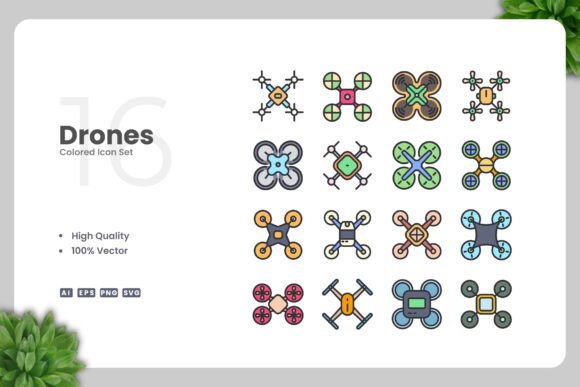
Drones Colored Icons is a collection of drone-themed vector graphics designed with a simple, clean aesthetic. Each icon uses color deliberately to highlight key features of unmanned aerial vehicles—propellers, camera mounts, flight paths, and control interfaces—without adding unnecessary detail or clutter. The set includes 100 vector files, available in formats such as Adobe Illustrator (AI), EPS Version 10, SVG, and PNG with transparency. A readme file is also included for quick reference.
What sets this collection apart is its balance between visual clarity and customizability. Because the icons are vector-based, you can resize them from a tiny app button to a large poster without losing sharpness. You can also change colors, adjust stroke weights, or rotate elements directly in vector software like Adobe Illustrator or CorelDRAW. This means you are not locked into a preset color palette or composition—you can adapt the icons to match your brand guidelines or the mood of your project.
Another distinguishing factor is the focus on drones specifically. Many icon sets include a single drone icon buried among hundreds of unrelated symbols. This collection is curated entirely around drone-related use cases, so you get a cohesive visual system for anything from drone delivery to aerial mapping.
How Drones Colored Icons Compare with Other Visual Approaches
When you need drone imagery, you have several options: custom illustrations, stock photography, monochrome icons, or specialized icon sets like this one. Each has its own strengths and limitations.
Custom Illustrations vs. Drones Colored Icons
Hiring a designer to create custom drone illustrations gives you complete originality. Your visuals will be unique to your brand, and you can tailor every detail to your exact specifications. However, this approach takes time and budget. If you are a startup, a small business, or an individual creator, the upfront cost may not be justifiable. Drones Colored Icons provide a professional starting point that you can customize to feel more bespoke. You can adjust colors, combine icons, or layer them with other design elements—all without the expense and turnaround time of custom work.
Stock Photography vs. Drones Colored Icons
Stock photos of drones can be visually powerful, especially when you need realistic context. A photo of a drone flying over a field or hovering near a delivery box tells a story instantly. But photos come with practical downsides: they are often large files, they do not scale uniformly across formats, and they can be hard to modify. Changing the color of a drone in a photo requires advanced editing skills, and the lighting and background may clash with your design. Icons, by contrast, are lightweight, scalable, and easy to edit. Drones Colored Icons give you a consistent, clean look across all your materials—whether digital or print—without the photographic baggage.
Monochrome Icon Sets vs. Drones Colored Icons
Monochrome icons are a classic choice for interfaces and print, especially when you want a minimalist, neutral look. They work well for app toolbars, navigation menus, and black-and-white documents. However, because they lack color, they can feel flat or fail to draw attention to specific elements. Adding color helps guide the viewer’s eye and can convey hierarchy or meaning—for example, using green for a ready-to-fly status or red for an alert. Drones Colored Icons give you that extra layer of communication while still keeping the design clean and uncluttered. If you later decide you need monochrome versions, you can easily remove the color in vector software.
Strengths of Drones Colored Icons: Where They Shine
Understanding the strengths of this icon set helps you decide if it is the right fit for your project. Several characteristics make it especially useful for a wide range of applications.
High Quality and Consistency
The icons are designed with a consistent style, so they look like they belong together. When you use multiple icons from the set—for example, a drone, a controller, a battery indicator, and a flight route—they form a unified visual system. This consistency is harder to achieve when you mix icons from different sources or styles.
100% Vector and Fully Scalable
Because the files are vector-based, you never have to worry about resolution. A single icon can be used on a 16-pixel mobile button and then scaled to fill a 2-meter banner without any loss of quality. This scalability is essential for brands that produce materials across multiple formats and sizes.
Easy Customization
You can edit each icon in Adobe Illustrator, CorelDRAW, or any vector editor. Change the color of the drone body, adjust the opacity of the camera lens, or rotate the propellers. This flexibility means you can align the icons with your brand colors, or create light and dark versions for different backgrounds. The drag and drop usability makes the initial setup straightforward even if you are not a design expert.
Multiple File Formats for Flexibility
Included are AI, EPS, SVG, and PNG files. SVG is ideal for web and app interfaces because it remains sharp at any size and supports interactivity. PNG with transparency works well for presentations, social media graphics, and quick mockups. AI and EPS are industry standards for professional print and further editing. This multi-format approach means you are covered whether you are working on a digital project, a printed brochure, or a video overlay.
Targeted Theme Without Extraneous Content
Because the collection focuses exclusively on drones, you do not have to sift through hundreds of unrelated icons to find what you need. This saves time and helps maintain a focused visual theme. For a drone delivery service, an agricultural drone company, or a hobbyist community, this specificity is a practical advantage.
Tradeoffs and Limitations to Consider
No single resource works perfectly for every situation, and Drones Colored Icons has its own set of tradeoffs worth evaluating.
Limited Visual Variety
While the icons are high quality, they follow a consistent design language. If you need a photorealistic drone image, a highly detailed technical diagram, or a unique artistic style, this set may not fulfill those requirements. The icons are deliberately simple and clean—this is a strength for cohesion, but it can feel repetitive if you are looking for more expressive or detailed visuals.
Color as Both a Benefit and a Constraint
The presence of color is useful for communication, but it also means the icons come with predefined palettes. If your brand uses very specific or unusual colors, you will need to spend time editing each icon. For users who are not comfortable with vector software, this can be a barrier. Additionally, if you need icons that work seamlessly across both light and dark backgrounds, you may need to create multiple versions.
May Not Cover Niche Use Cases
Although the set includes 100 icons, the drone ecosystem is broad. You might need a specific type of drone—for example, a fixed-wing agricultural drone, a racing drone, or an underwater drone. If your niche is not well represented, you may need to supplement the set with custom icons or additional resources.
Licensing and Usage Rights
Always review the licensing terms included with the set. While many icon sets allow commercial use, there can be restrictions on redistribution, sublicensing, or use in final products. The readme file typically includes this information. If you plan to use the icons in a product you sell, such as a template or app, confirm that the license covers that scenario.
When Drones Colored Icons Are the Right Choice
Based on the strengths and tradeoffs described, here are scenarios where Drones Colored Icons are likely an excellent match.
- You need a complete visual system for a drone-related website or app. The consistent style and multiple file formats make implementation efficient across pages, screens, and states.
- You are designing printed materials such as flyers, brochures, posters, or banners. Vector files ensure crisp output at any print size, and the color can be adjusted to match your marketing palette.
- You produce content for social media or infographics. The clean, colored icons stand out on feeds and help explain drone concepts quickly to a broad audience.
- You are building an educational resource, book, or guide about drones. The icons can illustrate concepts like flight modes, components, or safety zones in a way that is easy to understand.
- Your budget or timeline does not allow for custom illustration. This set gives you a professional foundation that you can customize, saving both time and money compared to starting from scratch.
When You Might Consider Alternatives
In some situations, another approach may serve you better.
- You require hyper-realistic or highly detailed imagery. For product packaging, detailed technical manuals, or advertising that demands photorealism, stock photography or a custom illustration may be more appropriate.
- Your brand uses a very specific artistic style. If your visual identity is hand-drawn, whimsical, or heavily branded in a way that simple colored icons cannot match, investing in custom icons aligned with your brand style is worth considering.
- You need a much larger set of icons covering hundreds of concepts beyond drones. In that case, a comprehensive icon library with a drone subset might be more economical.
- Your primary use is in a monochrome or low-color environment like a black-and-white print document or a minimalist interface. While you can remove color from this set, a monochrome-specific set may offer more refined glyphs for that purpose.
Practical Examples of Using Drones Colored Icons
To see how this set might work in practice, consider a few realistic scenarios.
Scenario 1: A drone delivery startup website. You need icons for the homepage to illustrate how the service works: order placement, drone dispatch, flight tracking, and package drop-off. Using Drones Colored Icons, you select four relevant icons and adjust their colors to match your brand blue and green. The icons load quickly as SVG files, remain sharp on retina screens, and can be animated for hover effects. You also use them in your pitch deck and on a printed flyer for local businesses.
Scenario 2: An agricultural consulting firm produces an infographic about drone-based crop monitoring. The icons for drone types, sensors, flight paths, and data analysis are all available in the set. You resize them to fit the infographic layout and change the color of the vegetation-related icons to green. The final PDF looks professional and is shared across social media and printed for trade shows.
Scenario 3: A mobile app for hobbyist drone pilots. The app uses icons for flight modes, battery levels, GPS status, and camera settings. The clean, colored design communicates status at a glance. Because the app needs both light and dark themes, you use vector software to create two color variants of each icon from the same base file. The consistent visual language helps users navigate the app intuitively.
Making an Informed Decision
Choosing the right visual resource depends on your project goals, timeline, budget, and technical capabilities. Drones Colored Icons offer a practical middle ground between generic icon sets and expensive custom work. They provide professional quality, scalability, and customization options, all centered on a specific topic that matters to your audience.
If you value consistency, ease of editing, and the ability to use the same assets across both digital and print media, this set is well worth considering. Take a few minutes to review the included icons and formats, and think about how they might align with your existing brand materials. For many drone-related projects, this collection can save time while still delivering a polished, cohesive look.
Ultimately, the best choice is the one that fits your specific workflow and communication needs. By weighing the strengths and limitations outlined here, you can decide whether Drones Colored Icons are the right addition to your design toolkit—or whether another approach better serves your goals.