Storytelling Colored Icons: A Practical Resource for Visual Communication
What Makes Storytelling Colored Icons Worth Your Attention
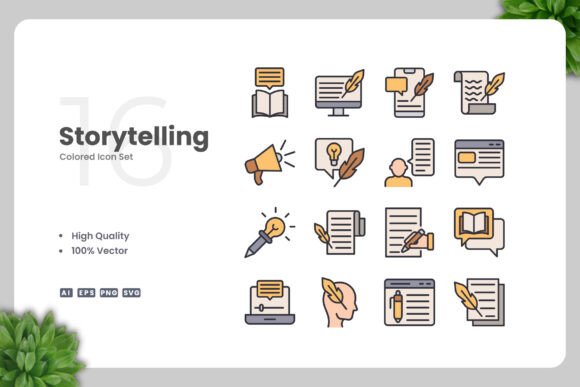
Visual communication depends heavily on icons. They shorten cognitive distance, clarify abstract concepts, and add personality to interfaces and printed materials. Storytelling Colored Icons is a vector icon set designed specifically to support narrative-driven design. Unlike generic icon packs that prioritize simplicity above all else, this collection focuses on icons that actually tell a story on their own or in sequence.
The set includes 100 vector icons, each crafted with a clean and consistent visual style. The icons are colored but not overly saturated, which makes them suitable for both digital and print environments. They are delivered in multiple formats: AI (Adobe Illustrator), EPS version 10, SVG, and PNG with transparency. A readme file is also included for quick setup guidance.
What distinguishes this icon set from the thousands of free and premium packs available is the intentional storytelling angle. Each icon is designed to represent a moment, an action, or an emotion rather than just an object. This makes the collection particularly useful for workflows where narrative clarity matters more than decorative appeal.
Clean Design with Purposeful Color
The visual style of Storytelling Colored Icons is simple without being minimal to the point of emptiness. Lines are clear, shapes are well-proportioned, and colors are used to reinforce meaning rather than distract. This balance is harder to achieve than it sounds. Many icon sets lean too far into flat design and lose expressive power, while others become cluttered with unnecessary detail. This set sits in a practical middle ground.
The color palette is restrained enough to remain professional but varied enough to support differentiation between similar concepts. For an entrepreneur building a pitch deck or a blogger creating feature graphics, this means icons remain readable at small sizes while still adding visual interest at larger scales.
Full Customization via Vector Software
Because the files are provided in AI and EPS formats, you can open them in Adobe Illustrator, CorelDRAW, Affinity Designer, or any compatible vector software. Resizing, recoloring, and combining icons is straightforward. The vectors are cleanly constructed, with well-organized layers and paths. This matters more than most buyers realize: poorly constructed vectors can break when scaled, produce odd artifacts when recolored, or require hours of cleanup before they become usable. Based on the file structure described and the source formats included, this set appears built with professional editing in mind.
Drag and Drop Usability
The icons are designed for easy drag and drop implementation. Whether you are placing them into a website mockup, a mobile app prototype, a social media template, or a print layout, you can simply open the file and copy the icon you need. This reduces friction during production and allows designers to focus on composition rather than file conversion.
Real-World Performance Across Use Cases
Storytelling Colored Icons performs well in several common scenarios, though no single icon set covers every possible need. Let us examine where this collection excels and where it may fall short.
Websites and Mobile Apps
For digital interfaces, the simple and clean design translates well across screen sizes. The colored icons work best when used sparingly, perhaps as section headers, feature highlights, or onboarding visuals. In full navigation menus, the colors might compete with other UI elements, so grayscale variants or selective recoloring are recommended for those contexts. Because the icons are vector, generating monochrome versions takes only seconds.
Social Media and Infographics
Social media posts benefit from icons that communicate quickly. A story-based icon set is particularly useful for carousel posts, educational threads, or brand storytelling sequences. Infographics also gain from consistent iconography: using icons from a single cohesive set prevents the visual fragmentation that occurs when you mix styles from multiple sources.
Print Materials: Flyers, Posters, Banners
Print requires higher resolution and predictable color reproduction. Since Storytelling Colored Icons includes SVG and EPS files, scaling to print resolutions is safe and lossless. The PNG transparency files are useful for quick placement in layouts where vector editing is not immediately needed. For professional print projects, always use the vector source files to ensure crisp output at any size.
Books and Educational Content
Educators and publishers may find the storytelling angle particularly valuable. Icons that suggest sequence, cause and effect, or emotional states can support textbook layouts, e-learning modules, and presentation slides. The clean design keeps the focus on content rather than decoration.
Quality, Reliability, and Long-Term Value
When evaluating any icon set, three factors determine long-term usefulness: consistency, editability, and format compatibility. Storytelling Colored Icons scores well on all three. The 100 icons share a coherent visual language, which means you can mix and match without jarring style shifts. The vector source files are future-proof: even as software updates occur, AI and EPS files remain widely supported. The inclusion of SVG ensures web-native compatibility, and PNG transparency covers quick previews and legacy workflows.
One limitation worth noting is the thematic scope. Because the set is built around storytelling, some icons are inherently narrative rather than purely functional. If your project requires extensive UI icons like settings gears, search magnifying glasses, or generic arrows, you may need to supplement this set with a dedicated UI icon pack. However, for content-driven projects, the storytelling focus is exactly what makes this collection valuable.
Another practical consideration: the set includes a readme file. While this may seem minor, it indicates that the creator has considered the user experience beyond just delivering files. Clear instructions reduce setup time, especially for less experienced users who may not know which format to use in which situation.
Who Benefits Most from Storytelling Colored Icons
Based on the design characteristics, included formats, and thematic focus, the following audiences will find the most value:
- Freelance designers and creative agencies who need a consistent icon set for client projects across multiple media types.
- Bloggers and content creators who want visually engaging icons for featured images, list posts, and social graphics without commissioning custom illustrations.
- Entrepreneurs and small business owners building pitch decks, product pages, or marketing collateral who need professional visuals on a limited budget.
- Educators and course creators developing learning materials where narrative flow and conceptual clarity are essential.
- Publishers and authors working on books, ebooks, or print layouts that benefit from clean, meaningful iconography.
- Marketers and social media managers producing consistent branded content across campaigns and platforms.
If you fall into any of these categories, this icon set is likely a practical addition to your resource library. If your work is heavily technical or requires thousands of highly specific UI symbols, consider using this set as a narrative complement to a more extensive UI icon collection.
Practical Recommendations for Getting the Most Out of This Set
To maximize the value of Storytelling Colored Icons, consider the following approaches:
- Recolor strategically. While the default colors are well chosen, aligning the palette with your brand or project color scheme increases cohesion. Vector editing makes this a five-minute task.
- Combine icons for sequences. Because the set emphasizes storytelling, try using multiple icons in sequence to illustrate processes, timelines, or before-and-after scenarios.
- Resize with intention. Test each icon at your target size early in the design process. Some icons with finer details may need slight simplification at very small scales, though the clean design minimizes this risk.
- Use SVG for web projects. SVG files offer small file sizes, scalability, and the ability to style with CSS. They are the best choice for responsive websites and modern web applications.
- Keep the source files organized. When you customize an icon, save a copy of the original in a separate folder. This prevents accidental overwrites and preserves the option to return to the default design later.
A Balanced Perspective on Limitations
No resource is perfect for every situation, and Storytelling Colored Icons has its boundaries. The set contains 100 icons, which is modest compared to some commercial packs that offer thousands. If your project demands a vast library of highly specific symbols, you may outgrow this collection quickly. Additionally, the thematic focus on storytelling means some icons are less abstract than typical UI icons. This is a feature, not a flaw, but it does mean the set is better suited for content-rich contexts than for purely functional interfaces.
Another point: while the vector files are editable, users who do not own vector editing software will need to rely on the included PNG files. For those users, customization options are limited. However, the PNG transparency files are still immediately usable for many common tasks, so this is only a limitation if you require frequent recoloring or resizing beyond the original dimensions.
Final Thoughts on Practical Fit
Storytelling Colored Icons is a well-constructed, thoughtfully designed icon set that serves a specific and valuable purpose: helping people communicate stories visually. It is not a generic UI icon megapack, and it does not try to be. Instead, it focuses on doing one thing well, which is providing clean, customizable, narrative-friendly icons for a wide range of media.
For professionals and creators who regularly produce content where visual storytelling matters, this set offers reliable quality, flexible file formats, and a coherent style that saves time and improves consistency. It is a practical tool, not a flashy gimmick, and that is exactly what makes it worth considering for your next project.