Ancient Egypt Icon Pack: Integrating Historical Symbolism into Modern Design Workflows
Visual communication relies on clarity, consistency, and cultural resonance. When a project demands historical depth—whether for educational content, branding, or interactive media—generic icon sets often fall short. The Ancient Egypt Icon Pack bridges the gap between thematic authenticity and practical design needs, offering a curated collection of symbols drawn from one of the most visually rich civilizations in history. But beyond the aesthetic appeal, the real value lies in how this resource fits into your existing creative or professional workflow.
This article explores what the Ancient Egypt Icon Pack is, where it belongs in your process, and how to use it effectively across different stages of a project. Whether you are a designer preparing assets for a client, an educator building course materials, or a content creator developing themed media, understanding the practical integration of this icon set will help you work faster, maintain consistency, and produce results that resonate with your audience.
What the Ancient Egypt Icon Pack Delivers
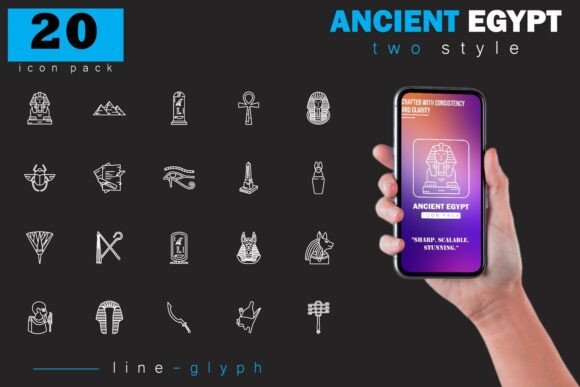
At its core, this bundle is a collection of vector and raster icons representing key elements of ancient Egyptian culture. The set includes pyramids, pharaohs, hieroglyphs, scarabs, the Eye of Horus, Anubis, sphinxes, temples, and other iconic motifs. Each icon is built with clean lines and historical awareness, meaning they avoid cartoonish reinterpretations in favor of designs that respect the source material.
The pack comes in four formats: AI, EPS, SVG, and PNG. This range covers nearly every use case. AI and EPS files are editable vector formats for professional design software. SVGs are lightweight and web-ready, ideal for digital interfaces or inline use. PNGs offer transparent backgrounds for quick drop-in placement without needing a vector editor. The combination ensures that whether you are working in Adobe Illustrator, Figma, Canva, Affinity Designer, or even a presentation tool like PowerPoint, you have a format that works.
Where the Icon Pack Fits in Your Workflow
The most effective way to think about this icon set is as a pre-assembled visual vocabulary. Instead of sourcing individual images from different places—each with inconsistent styles, resolutions, or licensing terms—you get a unified set that can be applied across multiple touchpoints. This makes it particularly valuable in three distinct phases of a project: preparation, execution, and refinement.
Before the Project: Research and Asset Planning
In the early stages of any project, you are defining direction. If your topic involves ancient Egypt—whether for a museum infographic, a history textbook layout, a mobile game about mythology, or a travel blog series on Egyptian landmarks—having a reference library of icons helps you visualize possibilities before committing to a design direction.
For example, an educator planning a unit on Egyptian religion might review the icon set to decide which deities to highlight. Seeing Isis, Osiris, Anubis, and Ra as consistent vector illustrations allows you to map out your visual hierarchy early. You can assign each god a specific icon to appear alongside text, saving time later when you start building slides or worksheets.
Similarly, a freelance designer pitching a rebrand for a museum store can present mood boards using these icons as placeholders. The client sees concrete imagery rather than vague descriptions. This builds confidence in your process and reduces revision cycles later.
During the Project: Direct Integration into Design Files
This is where the pack earns its keep. Because the icons are available in multiple formats, they can be dropped directly into active files without conversion delays. If you are working in Illustrator, open the AI file and drag individual symbols into your artboard. Each icon is on its own layer, so you can recolor, resize, or combine them without breaking the original files.
For web designers using Figma or Sketch, the SVG files are the natural choice. They scale infinitely, stay crisp on retina displays, and can be styled with CSS if needed. If you are building a landing page for an Egyptology course, you can import the SVG for a pyramid or a scarab directly into your component library. This keeps your design system lightweight and avoids the bloat of heavy PNGs.
Game developers working on a historical or puzzle game will appreciate the PNG files with transparent backgrounds. You can place a pharaoh icon as a UI button, a hieroglyph as a clue element, or an Anubis figure as a character avatar without spending hours masking backgrounds. The 300 DPI resolution in some file variants also supports print, so if you later make signage or packaging, the same asset scales up cleanly.
After the Project: Reuse and Iteration
One of the less obvious advantages of owning a themed icon pack is its reusability. Once the initial project is delivered, you retain a library of assets that can be repurposed for future work. A history blogger might use the icons first in a YouTube thumbnail, then later in an infographic, and still later in a printable timeline. Each use requires minimal rework because the icons are already optimized for multiple media.
If you manage content across a brand or organization, consistency matters. Using the same icon set across a website, printed brochure, social media template, and exhibition panel ensures that the visual language remains coherent. The Ancient Egypt Icon Pack becomes part of your standard toolkit, not a one-off purchase.
Practical Implementation Tips
Getting the most out of an icon pack involves more than just downloading the files. How you organize, customize, and combine these assets determines how much time you save and how polished the final output looks.
Organize Your Icon Library Early
Before you start dropping icons into designs, set up a folder structure that mirrors how you work. A simple system might include subfolders by category: Gods and Goddesses, Symbols and Talismans, Architecture and Monuments, Pharaohs and Rulers, and Writing and Hieroglyphs. Within each, keep the AI, EPS, SVG, and PNG versions together so you never hunt for the right format.
If you use a digital asset management tool like Eagle or a cloud-based system with tagging, add metadata like "Egypt," "ancient," "historical," and "icon" to make search fast. This upfront organization pays off every time you start a new project.
Customize for Context Without Losing Authenticity
The icons in this pack are designed with historical accuracy in mind, but your project may require color adjustments. A children's educational game might use brighter tones than a museum exhibition. Because the vectors are clean and well-constructed, you can change fill colors, stroke weights, or add drop shadows without distorting the shapes. Just be careful not to alter recognizable motifs to the point where they become inaccurate—a red Anubis might confuse viewers who associate the figure with specific ritual roles.
If you are working in a team, agree on a color palette and stroke style before customization begins. This prevents one designer's icon from looking heavier or lighter than another's when placed side by side.
Pair with Typography and Other Visual Elements
Icons rarely stand alone. They interact with text, photographs, illustrations, and layout grids. The clean lines of the Ancient Egypt Icon Pack make them compatible with both serif and sans-serif fonts. For a scholarly feel, pair them with a classic serif like Garamond or Palatino. For a modern digital app, try a geometric sans like Montserrat or Inter.
When combining icons with photographs, use PNG files with transparency to overlay icons onto images. For example, a faded papyrus texture as a background with a hieroglyph icon in the corner creates depth without clutter. The key is to maintain visual hierarchy—the icon should support the content, not compete with it.
Compatibility Across Tools and Platforms
One of the strongest arguments for investing in a well-formatted icon pack is cross-software compatibility. The Ancient Egypt Icon Pack works with virtually every major design environment.
- Adobe Creative Cloud: Illustrator, Photoshop, InDesign, and XD all support AI and EPS files. You can also drag SVGs directly into After Effects for motion graphics.
- Affinity Suite: Affinity Designer, Photo, and Publisher handle EPS and SVG without issues. The vector files retain editability.
- Figma and Sketch: Import SVG files as components. This allows you to maintain a single source of truth and update icons globally.
- Canva and PowerPoint: Use the PNG files with transparent backgrounds. While you lose vector editing, the ready-to-use format saves time for quick layouts.
- Web and Mobile Development: SVGs can be inlined in HTML or loaded as external assets. They style via CSS and scale on any device.
If you work in a pipeline where designers hand off assets to developers, providing SVGs from this pack eliminates the back-and-forth over resolution, format conversion, or background removal. The handoff becomes smoother.
Maintaining Quality Control and Consistency
Icon packs are only as good as their consistency. When you use assets from different sources, you often get mismatched line weights, varying levels of detail, or conflicting stylistic approaches. The Ancient Egypt Icon Pack avoids this by providing a unified visual language across all symbols. Every icon shares similar construction principles, which means they look cohesive when placed together.
To maintain that consistency during a project, establish a few simple rules:
- Stick to a single icon source. Avoid mixing these icons with unrelated sets unless you have a unifying style guide.
- Use the same stroke width. If you adjust one icon's outline, apply the same adjustment to all others in the same composition.
- Watch your sizing ratios. A pyramid icon should not be dramatically larger or smaller than a scarab unless intentional hierarchy is at play.
- Export all assets at the same resolution. For PNGs, choose 144 DPI for screen or 300 DPI for print, and stick to it across the set.
Quality control also extends to how the icons are named. The pack comes with descriptive file names, but if you rename them for your project, use a consistent convention like egypt-icon-anubis.svg or egypt-pyramid-outline.ai. This helps when linking assets in code or referencing them in documentation.
Long-Term Use and Scalability
A well-designed icon pack is not a one-time expense. It becomes a resource that grows with your portfolio. The Ancient Egypt Icon Pack can serve as a foundation for multiple projects over months or years. As you build templates, presentation decks, or design systems, you can reuse these icons without worrying about licensing restrictions—provided you respect the license terms of the bundle.
For agencies or in-house teams, this scalability is especially valuable. One purchase can support a series of educational products, a museum's entire digital presence, or a game studio's UI framework. The vector files ensure that as display resolutions evolve, your icons remain sharp. The PNGs work as fallbacks for legacy systems or print.
Think of the pack as a base layer. If future projects require variations—say, outline-only versions for coloring books or flat-color versions for app icons—you can derive those from the original vectors without redrawing anything. This is where the AI and EPS formats prove their worth over a decade of use.
Final Observations on Integration
Every project has constraints: deadlines, budgets, technical requirements, and audience expectations. The Ancient Egypt Icon Pack removes one variable from that equation by supplying ready-made, historically grounded visuals that work across media and tools. It does not replace the need for custom illustration or photography, but it handles the foundational symbols that projects commonly require.
If your workflow involves planning visuals ahead of execution, this icon set helps you prototype faster. If you are in the middle of production, it plugs directly into your existing files. If you are wrapping up and thinking about future work, it stays in your library as a reusable resource.
The key to a good workflow is not just having the right tools, but knowing when and how to use them. The Ancient Egypt Icon Pack fits naturally into each phase because it was built with practical use in mind. By organizing well, customizing intentionally, and maintaining consistency, you can bring the mystery and majesty of ancient Egypt into your projects without disrupting your process.