Evaluating Street Light Colored Icons for Your Design Projects
When building visual content for websites, mobile applications, print materials, or social media, selecting the right icon set can significantly influence both workflow efficiency and final aesthetic quality. One option that has gained attention among designers is the Street Light Colored Icons package. This collection is marketed as a versatile, vector-based resource suitable for a wide range of applications, from infographics to posters and banners. But how does it actually perform in real-world design work, and what should you consider before integrating it into your projects? This article provides a balanced evaluation to help you determine whether this icon set aligns with your specific goals and creative needs.
Understanding the Street Light Colored Icons Collection
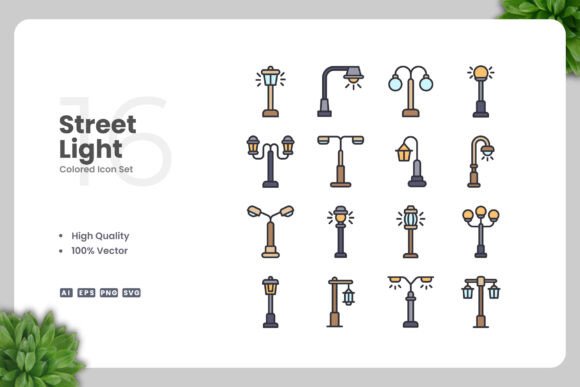
The Street Light Colored Icons set is a curated selection of icon graphics that are delivered in multiple vector formats, including Adobe Illustrator (AI), EPS version 10, SVG, and PNG with transparency. The icons are described as having a clean, simple design aesthetic with colored styling. They are intended to be fully editable, allowing users to resize, recolor, and modify elements using vector software such as Adobe Illustrator or CorelDRAW. The package also includes a readme file with basic instructions.
At its core, this is a resource aimed at designers who need ready-made visual elements that can be adapted to various contexts without starting from scratch. The emphasis on vector formats means the icons can scale infinitely without loss of resolution, which is a key advantage for both digital and print applications.
Why Designers Might Consider This Icon Set
Several factors make the Street Light Colored Icons appealing to those researching icon resources. First, the colored and clean design approach can save time compared to creating custom graphics from scratch. For projects that require a consistent visual language, having a unified set of icons with a shared style reduces the need for manual alignment and color matching.
Second, the inclusion of multiple file formats (AI, EPS, SVG, PNG) broadens compatibility across different software environments. Whether you work primarily in Adobe products, use open-source vector editors, or need raster images for quick mockups, the variety of formats provides flexibility. The SVG format in particular is useful for web and mobile development because it allows for direct embedding and styling with CSS.
Third, the promise of easy customization through vector software is a practical benefit. Designers often encounter icon sets that are locked down or require special procedures to modify. The Street Light Colored Icons are explicitly designed to be editable, which means you can adjust colors to match a brand palette, resize elements for different layouts, or combine icons with other graphics.
Benefits and Strengths: What Works Well
One of the primary strengths of this icon set is its simplicity. Clean, straightforward icons tend to be more versatile than highly detailed or stylized alternatives because they can be integrated into a wider variety of visual contexts without clashing with other design elements. For example, a simple colored icon works well both as a small button on a mobile app and as a larger graphic on a poster.
The vector nature of the files is another significant advantage. Vectors are resolution-independent, meaning they look sharp on high-DPI screens and can be printed at any size without pixelation. For print projects like banners, posters, and flyers, this is especially important because physical materials often require large file sizes that raster images cannot easily provide.
Additionally, the inclusion of a transparent PNG version saves time during prototyping and client presentations. You can drop the icons directly into a document or wireframe without having to export or convert formats first. For teams that need to share drafts quickly, this convenience is valuable.
Another benefit is the ease of drag-and-drop usage. When files are organized and named clearly, the workflow becomes faster. Designers can browse the icons visually and insert them into layouts without extensive file management.
Tradeoffs and Considerations to Keep in Mind
While the Street Light Colored Icons offer clear benefits, there are tradeoffs that should be weighed before making a decision. First, the icons are colored, which means they come with predefined hues. If your project requires a monochromatic or grayscale scheme, you will need to manually remove or change the colors. This is doable with vector software but adds an extra step to your workflow.
Second, the style of the icons is described as "simple and clean," which is generally positive. However, simplicity can sometimes border on generic design. For brands or projects that need a distinctive or highly specialized look, these icons may not provide enough visual personality. In such cases, a custom illustration set or a more unique icon style might be a better fit.
Third, the set is delivered as a static collection. Unlike subscription-based icon libraries that offer continuous updates and new additions, this package is a one-time purchase or download. Over time, your design needs may expand beyond the icons provided. If you frequently work on diverse projects, a larger or more frequently updated library might be more practical.
Another consideration is the software requirement. To fully edit the AI, EPS, and SVG files, you need access to vector editing software like Adobe Illustrator or CorelDRAW. While many designers already have these tools, those who rely solely on free or browser-based editors may find that certain features or layer structures are not fully compatible. The SVG files are more universally editable, but some advanced modifications are easier with dedicated software.
Situations Where This Icon Set Is a Strong Fit
The Street Light Colored Icons work best in environments where simplicity, clarity, and scalability are priorities. For example:
- Mobile and web app design: Clean icons are essential for navigation bars, action buttons, and settings menus. The SVG format integrates smoothly with modern front-end workflows.
- Social media graphics: Colored icons can add visual interest to posts, stories, and banners without requiring complex illustration work. They are easy to resize for different platform specifications.
- Infographics and data visualization: Simple icons help illustrate concepts without distracting from the data. They can be recolored to match charts and graphs.
- Print materials like flyers and posters: Vector files ensure crisp output at any size. The colored style reduces the need for additional graphic elements.
- Books and educational content: Icons can break up text and provide visual cues for readers. The clean design supports readability and comprehension.
In these scenarios, the balance between ready-to-use visuals and customizability offers a practical advantage. Designers can achieve a polished look without investing excessive time in icon creation.
When Alternatives May Be Worth Considering
There are situations where a different approach to icon selection might serve you better. If your project demands a very specific theme or industry-focused symbols, a generic colored icon set may not cover enough ground. For instance, specialized fields like medical, legal, or technical documentation often require icons that represent precise concepts. A dedicated professional icon set or custom illustration might be more appropriate.
Another scenario where alternatives could be considered is when your design system relies on a strict monochromatic or outline-only icon style. Some design systems, such as Material Design or iOS Human Interface Guidelines, favor simple outline icons over colored fills. While you can remove colors from the Street Light Colored Icons, the shapes and styles may not perfectly align with those guidelines.
Additionally, if your budget is extremely limited, there are free icon libraries available online that offer similar stylistic options. These may come with restrictions on commercial use or require attribution, so it is important to review licensing terms. The Street Light Colored Icons provide a clear, all-inclusive package without ongoing costs, but free alternatives can be sufficient for low-stakes or personal projects.
Finally, if you need a very large number of icons (hundreds or thousands), a comprehensive icon set or a subscription to an icon service might offer better value. Smaller curated collections like this one are ideal for focused projects but may not sustain a high-volume design workload.
Practical Decision-Making Insights
When evaluating the Street Light Colored Icons, consider the following practical points:
- Assess your color requirements: If your project uses a specific color palette, verify that the icon colors can be easily adjusted. Vector editing is straightforward but adds time to your workflow.
- Check software compatibility: Make sure you have access to a vector editor that can handle AI or EPS files. If you primarily use Sketch, Figma, or Inkscape, test how the SVG files import before committing.
- Review the icon variety: Look through the full set to confirm that the icons cover the subjects you need. Common categories like navigation, communication, weather, and objects are typical, but check for gaps.
- Think about long-term use: If you plan to use the icons across multiple projects, consider whether the style will remain consistent with your evolving design language. Simplicity tends to age well, but it is worth evaluating.
- Evaluate the file organization: A well-structured folder with clear file names and a readme can save time. The package is said to include a readme, which suggests attention to usability.
Another useful approach is to compare this set with other icon resources you have used or seen. Consider factors such as licensing, format availability, ease of editing, and the time required to customize icons to your needs. The Street Light Colored Icons offer a balanced combination of these elements, but your specific priorities will determine whether they are the best choice.
Determining Alignment with Your Goals
Ultimately, the decision to use the Street Light Colored Icons depends on how well they match your project requirements and workflow. If you value clean, scalable visuals that can be adapted quickly with vector software, this set is a practical resource. It is particularly well-suited for designers who need a middle ground between raw custom graphics and rigid, uneditable icon packs.
On the other hand, if your work demands a niche theme, a strict design system, or a very high volume of unique icons, you may find that a more specialized or extensive solution is necessary. The key is to match the resource to the scope and style of your specific project.
To make an informed choice, start by downloading or reviewing a sample of the icons if possible. Test them in your actual design environment. Change a color, resize an icon, and see how the file handles your workflow. This hands-on evaluation will give you the clearest picture of whether the Street Light Colored Icons will serve your needs effectively.
In summary, this icon set offers solid value for a range of common design tasks, especially when simplicity, editability, and format flexibility are important. By understanding both its strengths and its limitations, you can decide confidently whether to incorporate it into your toolkit.